lares4 console
A real console for the Lares4 protocol
Ksenia’s Lares4 panels speak a chatty, lightly documented WebSocket protocol. If you’re integrating with one — building automations, writing a client, debugging a deployment — you spend most of your time staring at JSON frames and guessing what the panel meant by them.
lares4-console is a native desktop app built for exactly that work. Connect, watch the protocol stream, send commands, save the setups you keep coming back
to. No browser tab, no wscat history scrollback, no ad-hoc scripts.
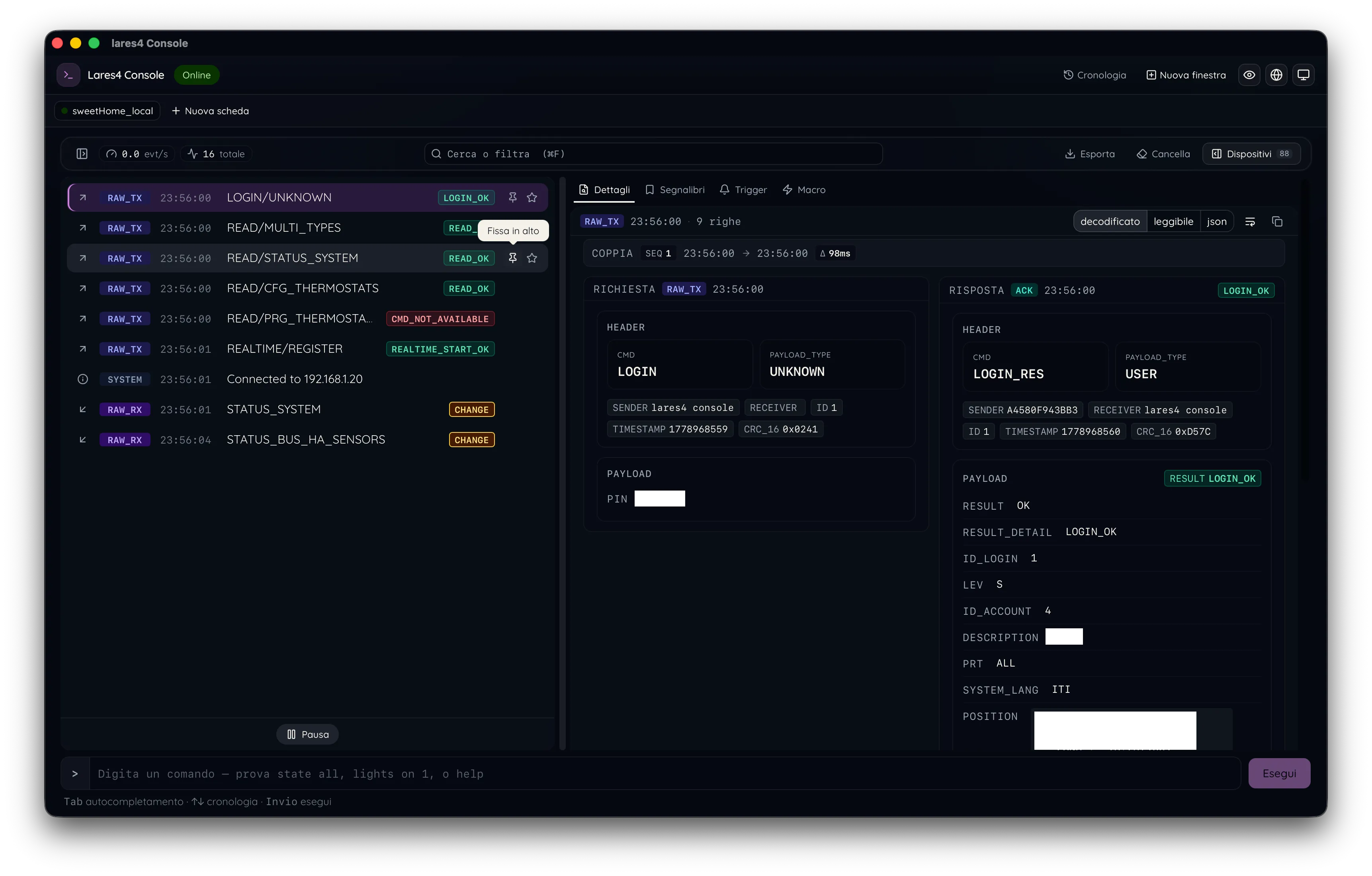
Built for the protocol, not around it
The console is powered by lares4-ts — the TypeScript client library for the same protocol — so what you see in the app
is exactly what the library sees on the wire. Decoded frames, named fields, status transitions. Not raw hex, not opaque blobs.
Tauri + React under the hood: a small native binary, no Electron weight, full light/dark/system theming, and the same UI on macOS, Windows, and Linux.
Connect and inspect
Set IP, PIN, sender ID, pick WS or WSS, hit connect. Save the setup as a profile — the app remembers your default and reconnects with one click next time. Multiple panels? Switch profiles from the sidebar.
The console workspace splits into three resizable panes: a keyboard-navigable log list, a detail view that pretty-prints whatever frame you select, and a command pane to send anything back. Connection and replay status are always visible as chips at the top — you always know whether you’re live or scrubbing history.
Macros, triggers, sessions
Pro features turn the console from a viewer into a workbench:
- Macros — sequence commands you run repeatedly, parameterize them, replay on demand
- Triggers — match frames against a small DSL and fire actions when conditions hit
- Annotations — mark frames inline so you don’t lose context when reviewing a session
- Session persistence — every session is captured to a local SQLite store, ready to replay or export
- Tabs and windows — multiple panels, multiple workspaces, no juggling
Localized
Full English and Italian translations, system-driven. The console reads like a native tool in either language, not a translated wrapper.
Key features
- Native desktop app — Tauri 2, small footprint, no Electron
- Cross-platform — macOS, Windows, Linux from one codebase
- Profile-driven connections — IP, PIN, sender, WS/WSS, saved and reusable
- Live protocol view — decoded frames via
lares4-ts, not raw JSON - Command pane — send any protocol message, with history and hints
- Macros and triggers — automate and react to the panel programmatically
- Session capture and replay — local SQLite, scrub through past traffic
- Annotations — pin context to frames inline
- Light / dark / system themes — follows your OS by default
- English and Italian — full localization
- Auto-updater — stay current without manual reinstalls
- Open source — TypeScript + Rust, source on GitHub
Install
Download the latest release from GitHub. Builds available for macOS, Windows, and Linux. You’ll need a Lares4 panel reachable on the network and its PIN to connect.